- Author: Potter White
- Date: July 2025
Project Overview
Situation:
In a custom product development project based on the Rockchip RK3568 SoC, I was responsible for the initial functional Bring-up of the onboard Gigabit Ethernet interface (GMAC1, ethernet@fe010000). Under the initial BSP configuration, the network interface failed to be correctly initialized by the kernel, with logs indicating errors such as Cannot attach to PHY and Failed to reset the dma.
My Role & Contributions: As the project’s BSP engineer, I was responsible for diagnosing and resolving this low-level hardware/software integration issue. My primary work included:
- Executed an end-to-end systematic investigation, covering the entire chain from the physical circuit layer to the kernel driver layer.
- Pinpointed the root cause, attributing it to a mismatch between the hardware design and the Device Tree (DTS) configurations for the GMAC1’s clock tree and pin functions (pinctrl).
- Led and implemented the corrective Device Tree solution, successfully enabling the network interface and ensuring its stable operation.
- Conducted performance verification using
iperf, confirming that the network throughput met the design standards for Gigabit Ethernet. - Codified the debugging process into a Standard Operating Procedure (SOP) to guide future bring-up tasks for similar peripherals.
My Methodology: Standard Operating Procedure (SOP) for Embedded Peripheral Bring-up
I have summarized a systematic workflow for hardware bring-up. This process structures the troubleshooting, enabling the localization and resolution of some complex issues from the physical layer to the driver layer through phased, multi-level verification, and significantly reduces debugging time.
Part 1: Standard Porting Workflow
This workflow is applied for debugging the Device Tree (DTS) and PHY driver when the hardware design is known and likely correct, and the serial console is stable and available.
- For those interested, see my log: GMAC Bring Up Work Flow
Part 2: Troubleshooting Checklist
When the standard workflow is unsuccessful, or if unknown hardware issues are suspected, this checklist provides a systematic investigation path from the physical layer to the control path.
- For those interested, see my log: GMAC Bring-Up Debug Strategies
SOP Flowchart
graph TD
    %% === Definitions & Styling ===
    classDef dark_main fill:#2c3e50,color:white,stroke:#8e9eab,stroke-width:2px;
    classDef dark_debug fill:#4b3e58,color:white,stroke:#b8a3d3,stroke-width:2px;
    classDef dark_decision fill:#27ae60,color:white,stroke:#88d1a1,stroke-width:2px;
    classDef dark_result_ok fill:#16a085,color:white,stroke:#72d6c1,stroke-width:2px;
    classDef dark_result_fail fill:#c0392b,color:white,stroke:#e69a93,stroke-width:2px;

    %% === Workflow Nodes Definition ===
    S[<b>Start</b>]:::dark_main
    A[<b>1. Hardware Interface Identification</b><br>GMAC0 or GMAC1]:::dark_main
    B[<b>2. Clock Scheme Analysis</b><br>Direction of 25MHz & 125MHz clocks]:::dark_main
    C[<b>3. Device Tree DTS Adaptation</b><br>Select correct DTS config from Rockchip's manual]:::dark_main
    D[<b>4. Compile & Verify</b>]:::dark_main

    F{"<div style='text-align:center'><i class='fa fa-question-circle'></i> <b>Validation</b><br>Is the network operational?</div>"}:::dark_decision

    G_Title["<b>Troubleshooting Checklist</b>"]:::dark_debug
    G["<div style='text-align:left; padding:10px;'><i class='fa fa-bolt'></i> <b>L1: Physical Layer Health Check</b><br>- Power Rails<br>- Reset Signal<br>- Reference Clock</div>"]:::dark_debug
    H["<div style='text-align:left; padding:10px;'><i class='fa fa-bullseye'></i> <b>L2: Control Path Verification</b><br>- U-Boot 'mii read'<br>- Kernel 'sysfs'</div>"]:::dark_debug
    I["<div style='text-align:left; padding:10px;'><i class='fa fa-cogs'></i> <b>L3: Key Logic Review</b><br>- Hardware Mode Strapping Pins<br>- Clock Direction</div>"]:::dark_debug

    SUCCESS[<b><i class='fa fa-check-circle'></i> Success</b>]:::dark_result_ok
    FAILURE["<div style='text-align:left; padding:10px;'><i class='fa fa-undo'></i> <b>Correct & Iterate</b><br>Based on diagnostics,<br>return to <b>Stage 3</b><br>to re-adapt DTS</div>"]:::dark_result_fail

    %% === Connections ===
    S --> A --> B --> C --> D --> F

    F -- "Yes" --> SUCCESS
    F -- "No" --> G_Title

    G_Title --> G --> H --> I --> FAILURE

    FAILURE -.-> C
Results & Verification
Following the methodology above, the issue was precisely located and resolved. Through systematic correction of the Device Tree, the dma reset error disappeared, and the network interface was successfully initialized.
To verify functional completeness and performance, I conducted comprehensive network throughput tests using the iperf tool. The results showed excellent performance, fully meeting the design expectations.
TCP Throughput Test (RK3568 <-> PC)
Uplink (RK3568 -> PC):
941 Mbits/sec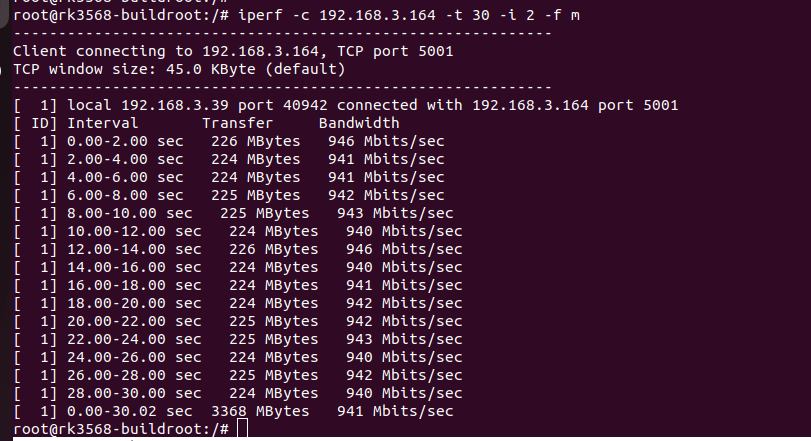
Downlink (PC -> RK3568):
928 Mbits/sec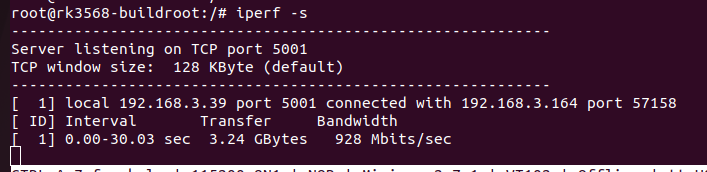
Conclusion: The TCP throughput reached the theoretical limit of Gigabit Ethernet, proving the data path is both efficient and stable.
UDP Stress Test (RK3568 <-> PC, @1Gbps)
- Downlink Packet Loss:
0.023%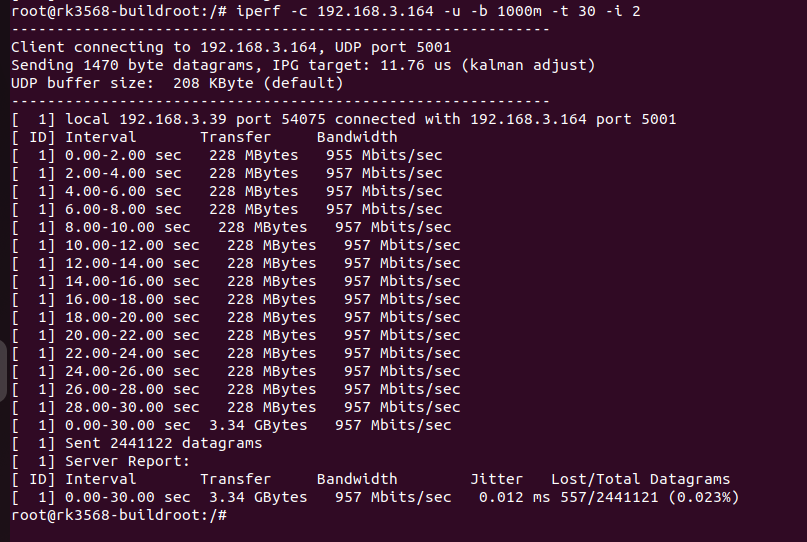
Conclusion: Under maximum bandwidth stress, the packet loss rate was extremely low, indicating a very robust system capability for handling network packets.
Tech Stack & Tools
- Hardware Platform: Rockchip RK3568 SoC, YT8251SC Gigabit Ethernet PHY
- Software Environment: Linux Kernel 5.10, U-Boot, Buildroot
- Core Technologies: Embedded Linux BSP, Device Tree (DTS), Kernel Drivers (stmmac), MDIO/RGMII Protocols
- Debugging Tools:
- Hardware: Oscilloscope, Multimeter, Serial Console
- Software:
dmesg,printk,sysfs,iperf,mii-tool