How-to: RK3568下强制HDMI的配置
A guide on how to force the HDMI connection status (HPD) and set a fixed resolution via DTS on Rockchip RK3568, bypassing EDID.
Categories:
4 分钟阅读
How-to:hdmi keep connected no matter what
原理图:
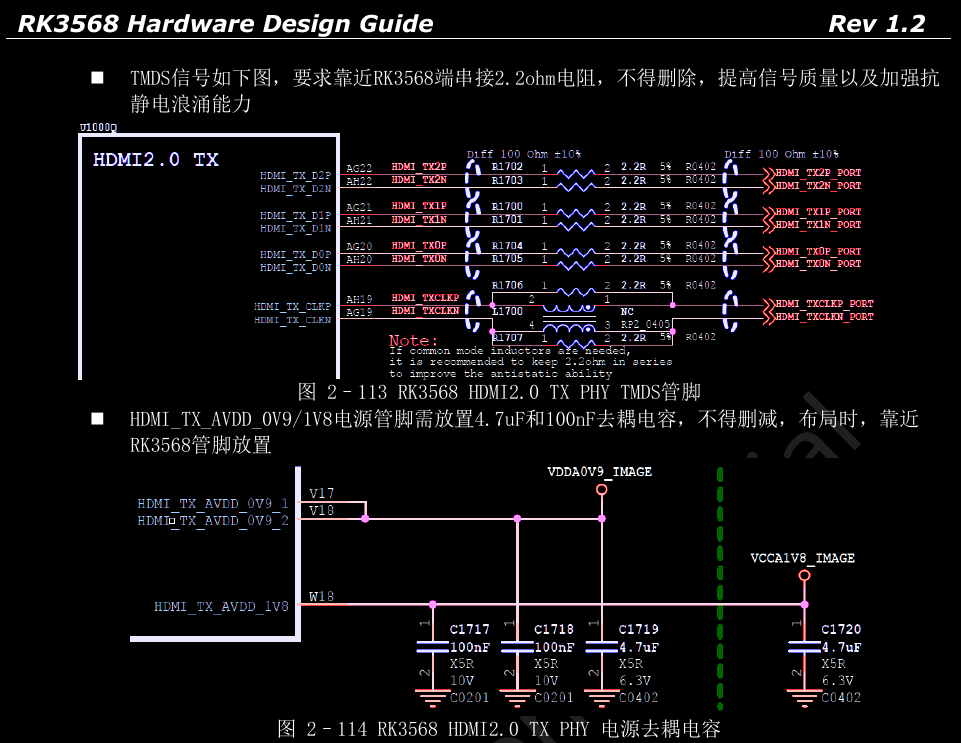
检测: 不是用gpio控制的
- 不管是设置hpd-state还是force_hpd;都是不起作用
- display-timings 也不行
- 接下来就得考虑改变cmdline了…这是唯一可用的方式
解决办法(成功)
打开kernel/drivers/gpu/drm/bridge/synopsys/dw-hdmi.c 修改函数dw_hdmi_phy_read_hpd 修改为如下:
enum drm_connector_status dw_hdmi_phy_read_hpd(struct dw_hdmi *hdmi,void *data)
{
	// return hdmi_readb(hdmi, HDMI_PHY_STAT0) & HDMI_PHY_HPD ?
	// connector_status_connected : connector_status_disconnected;
	return connector_status_connected;
}
How-to: hdmi强制分辨率
做法(solution)
打开kernel/arch/arm64/boot/dts/rockchip/submodule-display.dtsi 修改hdmi节点(rk3568只有一个hdmi) 修改为如下(可以添加其他内容,但是必须得有以下的几个语句和块):
&hdmi {
	status = "okay";

	/*
	 * Use 'force-output' to trigger the driver's logic to ignore EDID
	 * and use the 'force-timing' node below.
	 * The properties 'force_hpd' and 'hpd-state' are not standard
	 * for this driver and should be removed.
	 */
	force-output;

	/*
	 * This node provides the specific timing information that the driver
	 * will use when 'force-output' is present.
	 * The name 'force_timing' is not what the driver looks for.
	 * It must be a child node named "force-timing".
	 */
	force_timing {
		clock-frequency = <148500000>;
		hactive = <1920>;
		vactive = <1080>;
		hfront-porch = <88>;
		hsync-len = <44>;
		hback-porch = <148>;
		vfront-porch = <4>;
		vsync-len = <5>;
		vback-porch = <36>;
		hsync-active = <1>; /* <1> for positive sync, as per standard 1080p60 */
		vsync-active = <1>; /* <1> for positive sync, as per standard 1080p60 */
	};

	/* 'display-timings' is typically used by simple-panel drivers,
	 * not by the dw-hdmi bridge driver for forcing modes.
	 * We should remove this section to avoid confusion.
	 */
	// display-timings { ... };
};
做法思路解析
重要步骤
- display-timings不适合rk的hdmi驱动
- 一定要是force_timing, 尤其是下划线不可以写错
- 一定要写force-output,否则force_timing写了也没用
依据-源代码-(dw_hdmi-rockchip.c)
- kernel/drivers/gpu/drm/rockchip/dw_hdmi-rockchip.c
- static int rockchip_hdmi_parse_dt(struct rockchip_hdmi *hdmi)
- 这个函数有一段代码:
if (of_property_read_bool(np, "force-output")) {
	hdmi->timing_force_output = true;

	ret = of_get_display_timing(np, "force_timing", &timing);
	if (ret < 0) {
		dev_err(hdmi->dev, "can't get force timing\n");
		hdmi->timing_force_output = false;
		return ret;
	}

	videomode_from_timing(&timing, &vm);
	drm_display_mode_from_videomode(&vm, &hdmi->force_mode);
	hdmi->force_mode.type |= DRM_MODE_TYPE_PREFERRED;

	if (of_property_read_u32(np, "force-bus-format", &hdmi->force_bus_format))
		hdmi->force_bus_format = MEDIA_BUS_FMT_RGB888_1X24;
}
这里就是说如果去读到force-output,就进一步去读force_timing. 然后就会内核中读取到正确的强制时序,接着就进一步按照强制时序来设置
开机log
[    3.075190] rockchip-vop2 fe040000.vop: Adding to iommu group 8
[    3.081939] rockchip-vop2 fe040000.vop: [drm:vop2_bind] vp0 assign plane mask: 0x3f, primary plane phy id: 4
[    3.081965] rockchip-vop2 fe040000.vop: [drm:vop2_bind] vp1 assign plane mask: 0x0, primary plane phy id: -1
[    3.081975] rockchip-vop2 fe040000.vop: [drm:vop2_bind] vp2 assign plane mask: 0x0, primary plane phy id: -1
[    3.082097] rockchip-vop2 fe040000.vop: [drm:vop2_bind] Cluster0-win0 as cursor plane for vp0
[    3.082151] rockchip-vop2 fe040000.vop: [drm:vop2_bind] VP1 plane_mask is zero, so ignore register crtc
[    3.082174] rockchip-vop2 fe040000.vop: [drm:vop2_bind] VP2 plane_mask is zero, so ignore register crtc
[    3.082249] [drm] failed to init overlay plane Cluster0-win1
[    3.082288] [drm] failed to init overlay plane Cluster1-win1
[    3.082369] rockchip-drm display-subsystem: bound fe040000.vop (ops 0xffffffc009381478)
[    3.082647] dwhdmi-rockchip fe0a0000.hdmi: Detected HDMI TX controller v2.11a with HDCP (DWC HDMI 2.0 TX PHY)
[    3.083208] dwhdmi-rockchip fe0a0000.hdmi: registered DesignWare HDMI I2C bus driver
[    3.083434] dwhdmi-rockchip fe0a0000.hdmi: IRQ index 1 not found
[    3.083783] rockchip-drm display-subsystem: bound fe0a0000.hdmi (ops 0xffffffc009390598)
[    3.084132] rockchip-drm display-subsystem: route-edp: failed to get logo,offset
[    3.084146] rockchip-drm display-subsystem: route-hdmi: failed to get logo,offset
[    3.084156] rockchip-drm display-subsystem: can't not find any logo display
[    3.084166] rockchip-drm display-subsystem: failed to show kernel logo
[    3.091830] rockchip-vop2 fe040000.vop: [drm:vop2_crtc_atomic_enable] Update mode to 1920x1080p60, type: 11(if:800, flag:0x0) for vp0 dclk: 148500000
[    3.093308] rockchip-drm display-subsystem: [drm] fb0: rockchipdrmfb frame buffer device
[    3.101205] [drm] Initialized rockchip 3.0.0 20140818 for display-subsystem on minor 0
[    3.101392] rockchip-drm display-subsystem: [drm] run display error_event monitor
[    3.106409] input: hdmi_cec_key as /devices/platform/fe0a0000.hdmi/dw-hdmi-cec.1.auto/input/input0
log-(modetest)
        crtc    type    possible crtcs  possible clones
153     0       Virtual 0x00000001      0x00000001
155     85      TMDS    0x00000001      0x00000002

Connectors:
id      encoder status          name            size (mm)       modes   encoders
156     155     connected       HDMI-A-1        0x0             1       155
  modes:
        index name refresh (Hz) hdisp hss hse htot vdisp vss vse vtot
  #0 1920x1080 60.00 1920 2008 2052 2200 1080 1084 1089 1125 148500 flags: phsync, pvsync; type: preferrd
  props:
        1 EDID:
                flags: immutable blob
                blobs:

                value:
        2 DPMS:
                flags: enum
                enums: On=0 Standby=1 Suspend=2 Off=3
                value: 0
        5 link-status:
                flags: enum
                enums: Good=0 Bad=1
                value: 0
        6 non-desktop:
                flags: immutable range
                values: 0 1
                value: 0
        4 TILE:
                flags: immutable blob
                blobs:

                value:
        157 max bpc:
                flags: range
                values: 8 16
                value: 0
        7 HDR_OUTPUT_METADATA:
                flags: blob
                blobs:

                value:
        158 color_depth:
                flags: enum
                enums: Automatic=0 24bit=8 30bit=10
                value: 8
        159 color_format:
                flags: enum
                enums: rgb=0 ycbcr444=1 ycbcr422=2 ycbcr420=3 ycbcr_high_subsampling=4 ycbcr_low_subsamp6
                value: 0
        160 color_depth_caps:
                flags: range
                values: 0 255
                value: 1
        161 color_format_caps:
                flags: range
                values: 0 15
                value: 1
        162 HDR_PANEL_METADATA:
                flags: immutable blob
                blobs:

                value:
        163 NEXT_HDR_SINK_DATA:
                flags: immutable blob
                blobs:

                value:
        164 output_hdmi_dvi:
                flags: enum
                enums: auto=0 force_hdmi=1 force_dvi=2
                value: 0
        165 output_type_capacity:
                flags: enum
                enums: DVI=0 HDMI=1
                value: 1
        166 hdmi_quant_range:
                flags: enum
                enums: default=0 limit=1 full=2
                value: 0
        167 Colorspace:
                flags: enum
                enums: Default=0 SMPTE_170M_YCC=1 BT709_YCC=2 XVYCC_601=3 XVYCC_709=4 SYCC_601=5 opYCC_62
                value: 0
        168 Content Protection:
                flags: enum
                enums: Undesired=0 Desired=1 Enabled=2
                value: 0
        169 HDCP Content Type:
                flags: enum
                enums: HDCP Type0=0 HDCP Type1=1
                value: 0
        170 hdcp_encrypted:
                flags: range
                values: 0 2
                value: 0
        51 brightness:
                flags: range
                values: 0 100
                value: 50
        52 contrast:
                flags: range
                values: 0 100
                value: 50
        55 saturation:
                flags: range
                values: 0 100
                value: 50
        56 hue:
                flags: range
                values: 0 100
                value: 50
dts里写的时序要去哪里抄?
谷歌搜索Video Timings Calculator 例如: https://tomverbeure.github.io/video_timings_calculator?horiz_pixels=1920&vert_pixels=1080&refresh_rate=60&margins=false&interlaced=false&bpc=8&color_fmt=rgb444&video_opt=false&custom_hblank=80&custom_vblank=6
内核源代码 例如drivers/gpu/drm/drm_modes.c