qml notes
4 分钟阅读
001. **[Expose Properties]property alias **
property alias ${EXTERNAL_SHARED_ID}: ${INNER_ID}
if we have this statement in sub-qml files, the qml file who invoke current sub-qml file could access these or this component whose id is ${EXTERNAL_SHARED_ID}
002. QML的模块化
case:我要如何在子文件a.qml里面去访问子文件b.qml里面的某一个属性,例如height?
solutionA:
透过父文件进行指定,父文件在创建a和b两个对象的实例的时候,就可以指定他们的height; 至于如果要指定的还不是height这种属性,而是比较难访问的属性,怎么办呢?就得看看其他办法。
solutionB:
用信号槽的方式
这种方式是qt的原生自带的技术
solutionC:
用property
在 QML 中,你可以在子文件(例如 Background.qml 和 Buttons.qml)中定义 property,用来暴露组件的某些属性,如 height,以便在父组件中访问这些属性。
003. Debug: qt.gui.imageio: libpng warning: iCCP: known incorrect sRGB profile
Post about the reason of this warning
004. 取整怎么做?
在 QML 中,你可以使用 Math.floor()、Math.ceil() 或 Math.round() 函数来对带小数的数值进行取整操作:
    Math.floor(value): 返回不大于 value 的最大整数,即向下取整。
    Math.ceil(value): 返回不小于 value 的最小整数,即向上取整。
    Math.round(value): 返回四舍五入后的整数。
005. 要点
函数不能以大写字母开头
006. startSystemMove()的逻辑
startSystemMove is designed to send a system signal to the entrance of window moving model
what gpt4o said:
problem
when i clicked left button of my mouse, the code will trigger vp_window_id.startSystemMove() for supporting window`s moving function.
so i wrote it like below
onPressed: {
    if(SingletonModule.IfOnlyMouseLeftButtonPressed(titleMouseArea)){
        vp_window_id.startSystemMove()

    }else if(SingletonModule.IfOnlyMouseRightButtonPressed(titleMouseArea)){
        console.log("right")
    }
}
but now met the problem:
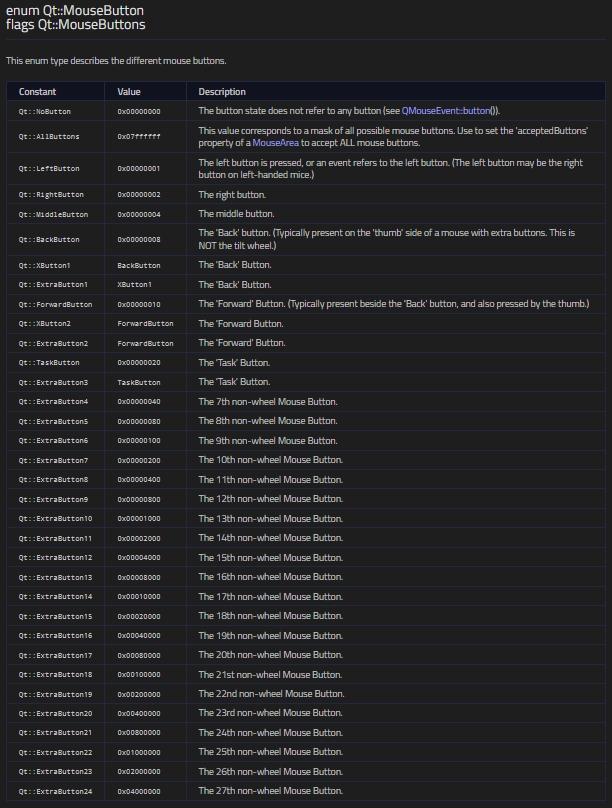
when i clicked the left button of the mouse, and did not move the mouse (no position changed), the startSystemMove had been sent anyway. and now the titleMouseArea.pressedButtons always keep Qt.LeftButton actually equals 1.Even i release the left button of my mouse quickly, the state did not change.
so now when i clicked left button, nothing happened.
when i clicked right button, illegal value of titleMouseArea.pressedButtons came with 3, it is illegal actually like the pic below, it also means left button plus right button together.
solution
onPressed:

MouseArea {
    id: titleMouseArea
    anchors.fill: parent
    acceptedButtons: Qt.LeftButton | Qt.RightButton
    preventStealing: true
    pressAndHoldInterval: 100

    property bool isDragging: false
    onPressed: {
        if(SingletonModule.IfOnlyMouseLeftButtonPressed(titleMouseArea)){
            isDragging = true

        }else if(SingletonModule.IfOnlyMouseRightButtonPressed(titleMouseArea)){
            console.log("right")
        }

        console.log("\n")
    }
    onPositionChanged: {
            console.log("x=", mouse.x,
                        "y=", mouse.y)
        if(isDragging){
            vp_window_id.startSystemMove()
            console.log("position changed: left")
        }
    }
    onReleased: {
        isDragging = false
        console.log("Button released. Current pressedButtons:", titleMouseArea.pressedButtons)
    }
}
the solution is a logic control that when i click left button, onPressed set the flag variable TRUE, and if i do not move the cursor away, the onRelease slot will set the flag variable to FALSE. Until i click and at the same time move the cursor away(position changed), the onPositionChanged slot will send vp_window_id.startSystemMove() out to the system.
conclusion
actually higher level language is boring because of that they could not control the low layer system at some times. and personaly customize the titlebar of a window is such a heave job.
007. MouseArea.mouseX(y) VS ${Container_ID}.x(y)
i have a sub module
import QtQuick
import QtQuick.Controls
import SingletonForVolumeMixer 1.0

Menu {
    id: bID_Private_contextualMenu
    MenuItem {
        text: qsTr("最小化")
        onTriggered: {
            // 实现最小化逻辑
        }
    }
    MenuItem {
        text: qsTr("最大化")
        onTriggered: {
            // 实现最大化逻辑
        }
    }
    MenuItem {
        text: qsTr("关闭")
        onTriggered: {
            // 实现关闭逻辑
        }
    }
}
and when i try to instantiate this module as container of my main.qml error method:
    CustomizedMenu {
        id: rightkeyMenu
        x: MouseArea.mouseX
        y: MouseArea.mouseY
    }

    ...

    onPressed: {
                rightkeyMenu.open()
    }
have a warning:
qrc:/qt/qml/content/Title/xxx.qml:50:9: Unable to assign [undefined] to double
qrc:/qt/qml/content/Title/xxx.qml:49:9: Unable to assign [undefined] to double
correct method:
    CustomizedMenu {
        id: rightkeyMenu
        // x: MouseArea.mouseX
        // y: MouseArea.mouseY
    }

    ...

    onPressed: {
        rightkeyMenu.x = mouse.X
        rightkeyMenu.y = mouse.y
        rightkeyMenu.open()
    }
why-from GPT4o:
你遇到的问题主要与QML中的**属性绑定机制**以及**组件生命周期**有关。当你在`Menu`容器中直接尝试绑定 `x: mouseArea.mouseX` 和 `y: mouseArea.mouseY` 时,可能会遇到以下问题:

### 1. **属性未初始化**
`mouseArea.mouseX` 和 `mouseArea.mouseY` 这类属性在`MouseArea`中表示相对坐标,但它们在某些情况下可能未初始化,特别是在组件刚刚加载时。这可能导致`Menu`组件在初始化时尝试访问这些属性,而它们尚未定义,导致出现`undefined`错误。

### 2. **组件加载顺序**
QML中,属性的绑定通常在组件加载和初始化时执行。如果在`Menu`的定义中试图直接访问这些属性,而`MouseArea`还没有触发任何事件,属性值可能未被设置。因此,在菜单加载时,这些属性可能仍然是`undefined`,这会导致无法将`undefined`分配给`Menu`的`x`或`y`属性。

### 3. **绑定的时机**
在 `Menu` 容器中直接绑定 `x: mouseArea.mouseX` 和 `y: mouseArea.mouseY` 是静态绑定,在QML的生命周期内,可能不会动态更新。只有当 `MouseArea` 触发点击事件时,`mouse.x` 和 `mouse.y` 才会有值,这意味着这些值只有在事件发生时才是有效的。

### 为什么`mouse.x` 和 `mouse.y` 方式有效?

通过在 `MouseArea` 的 `onClicked` 处理器中动态设置 `Menu` 的 `x` 和 `y` 属性,你确保了在鼠标点击事件发生时,这些值是最新的、有效的。因为点击事件发生后,鼠标的坐标已经被正确捕获并可以使用,所以这种方式不会遇到属性未定义的问题。

### 总结
直接在`Menu`容器中绑定鼠标坐标可能会遇到初始化顺序和属性绑定的时机问题。而在`MouseArea`的点击事件中动态设置`Menu`的坐标确保了这些坐标是在事件发生后获取的,因此是有效的。这是两种方法表现不同的主要原因。
008: 属性property vs 容器container
属性(Property):
    属性在 QML 中是一种定义对象或元素特征的方式。属性可以是简单的值(如 color、width、height),也可以是更复杂的对象(如 Item、Rectangle)。
    当属性持有复杂对象时,这些对象可以被视为容器,因为它们可以包含其他元素,并通过大括号 {} 来定义。

容器(Container):
    容器通常是指那些能够包含其他 QML 元素的对象。例如,Rectangle、Item、Column 都是典型的容器元素,因为它们可以在大括号 {} 内定义其他元素。